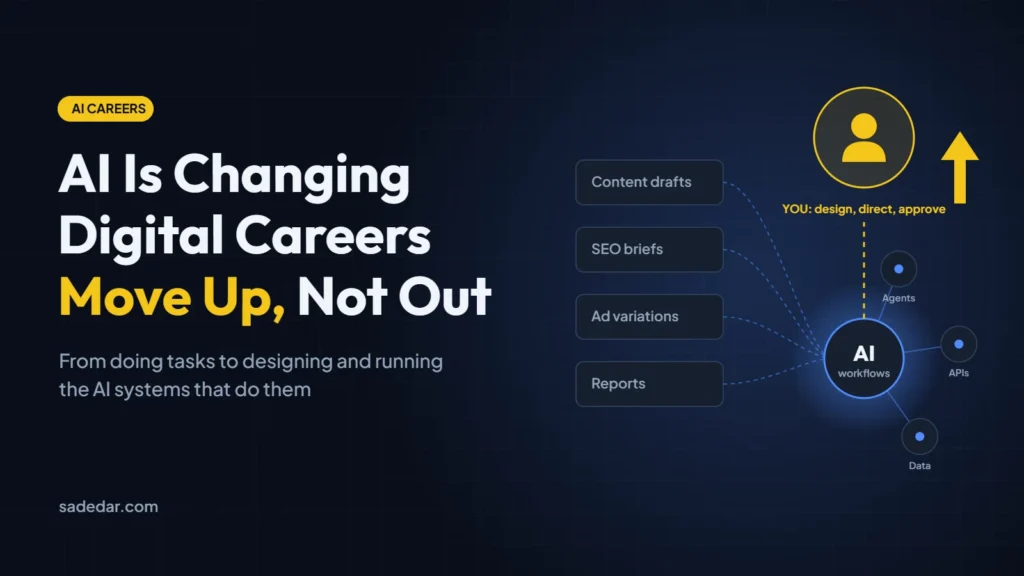
If you work in digital, whether that’s SEO, content, paid ads, design, web development or IT support, you have probably already felt it: work that used to take a day now takes an hour with AI, and clients are noticing. A lot of the tasks that built digital careers over the last fifteen years are being automated faster than most people expected.
That does not mean digital careers are over. It means the task-based version of them is ending. The people who do well over the next few years will be the ones who stop selling tasks and start designing, running and being accountable for systems that use AI. This guide is about how to make that shift deliberately, before the market forces it on you.
I noticed the shift when I looked at how my own work fit together. On any given week I was moving between websites, cybersecurity, SEO, CRM updates and project management, and the same information was being retyped at every step. Using AI to draft content was the obvious first win, but the bigger opportunity was the work in between: turning client requests into tasks, following up, and producing reports. That is what made business automation, not just faster writing, the focus of my learning.
What the Research Actually Says
- The McKinsey Global Institute estimates that activities accounting for up to 30% of hours worked in the U.S. could be automated by 2030, with generative AI accelerating the trend.
- The World Economic Forum Future of Jobs Report 2025 expects employers to see about 39% of workers’ core skills change between 2025 and 2030.
- The same WEF report projects around 170 million jobs created and 92 million displaced globally by 2030. That is a net gain, but the new jobs require different skills from the ones being lost.
Read together, the numbers say something more useful than “AI will take your job”: a large share of the work inside digital jobs is being automated, and the value is moving to whoever can direct that automation and answer for the result.
The Digital Tasks AI Is Absorbing Fastest
These are the tasks where AI output is already “good enough” for many clients, so their market price is falling quickly:
- Content production at volume: first drafts, product descriptions, social captions, blog posts written to a brief.
- Routine SEO: keyword lists, meta titles and descriptions, basic on-page audits, content briefs.
- Ad production: headline and description variations, basic image and video variations, routine bid and budget adjustments, much of which ad platforms now automate themselves.
- Template websites: brochure sites and landing pages built from a page builder and a prompt.
- Reporting: pulling numbers into monthly reports and writing the summary paragraph.
- First-line support: answering common questions, triaging tickets, drafting replies.
If most of your week is spent on this list, your role is the one most exposed. That is not a judgment of your skill; it is where the economics are moving.
What AI Still Cannot Do for a Business
- Be accountable. A client still needs a person who owns the outcome when a campaign underperforms or a system breaks.
- Understand the business. Knowing why a lead is valuable, which customers are profitable and what the owner actually wants is context that AI does not have.
- Connect messy real-world systems. CRMs, ad accounts, websites, phone systems and spreadsheets rarely fit together cleanly. Someone has to design and maintain the plumbing.
- Judge quality and risk. Deciding what is accurate, on-brand, legally safe and worth publishing is still a human call.
- Build trust. Clients buy from people they trust, especially when the work involves their money, data or reputation.
Notice that every item on this list is about owning a result, not completing a task. That is the shift.
Five Moves to Take Your Digital Career to the Next Level
1. Move from doing tasks to designing AI workflows
The most direct path is to become the person who builds the automation instead of the person whose work gets automated. Learn to map a repeated process, decide which steps AI can do, which need a person, and connect the tools. A content writer who can build a research-draft-review-publish workflow is worth more than one who writes faster.
2. Learn how AI agents work, step by step
AI agents are the next layer: systems that can plan, call tools and take actions, not just generate text. You do not need a computer science degree, but you do need to understand the stack in order:
- Writing clear instructions and examples (prompting) for business tasks.
- Connecting AI to tools: APIs, webhooks and automation platforms such as n8n, Make or Zapier.
- Giving AI access to company knowledge safely (retrieval over documents and data).
- Agent platforms and how they handle planning, memory and tool use.
- Evaluation and guardrails: testing outputs, limiting permissions and keeping a human approval step for anything that spends money, sends messages or changes data.
3. Sell outcomes, not deliverables
If you charge per blog post, per ad set or per report, AI is pushing your price toward zero. Re-frame your work around the business result: qualified leads, booked calls, response time, cost per acquisition, hours saved. Outcomes are harder to automate away because they require judgment across the whole system.
4. Go deep in one industry
A generalist “digital marketer” competes with AI and with everyone else. A specialist who understands how dental practices, law firms, contractors or SaaS companies win customers brings context that AI does not have. Pick an industry you already know and learn its numbers, regulations and buying process.
5. Build public proof of what you can do
Hiring managers and clients increasingly ask “show me”, not “tell me”. Document the workflows you build, the before-and-after time savings, and what went wrong. A small portfolio of real automations is more convincing than a list of certificates.
A Real Example: Turning Email-Based Billing into an AI Workflow
Here is one workflow my team built, and the kind of proof I mean. The client is a professional-services firm that bills its own customers by time, so I’ll keep the details general.
The problem
The firm bills on a time-and-materials basis, and much of that time is spent in email. To invoice accurately, someone had to go back through mailboxes, work out which emails belonged to which matter, and assign billable minutes to each one. It was slow and repetitive, and it meant spending billable hours auditing past billable hours.
The tools
- Claude to turn meeting transcripts into requirements, help write the application code and estimate time from email content.
- Microsoft Graph API for secure, programmatic access to Microsoft 365 mailboxes, with Microsoft 365 single sign-on for logins.
- Coolify, an open-source, self-hosted platform for running Docker applications, on a Hetzner cloud server.
How the workflow runs
Build (one time)
From a scoping call to a deployed app
- Scoping callRecorded on Zoom, exported as a transcript
- Requirements and codeClaude turns the transcript into requirements, then app code
- Review and testWe check the code, permissions and sample results
- DeployDocker container on a Hetzner server, managed with Coolify
Run (every billing cycle)
From mailbox to billing report
- Sign inStaff log in with their Microsoft 365 account (SSO)
- Fetch emailMicrosoft Graph API pulls the relevant mailbox data
- Estimate timeAI groups emails by matter and suggests billable minutes
- ApproveA person reviews and adjusts the report before billing
Steps where a person stays in control
The build started with a recorded scoping call. We fed the transcript to Claude to draft the requirements, then used it to help write a small web application. The app connects to Microsoft Graph, pulls the relevant emails, and produces a billing report with suggested minutes per task. It runs as a Docker container on Coolify, and staff sign in with the Microsoft 365 accounts they already use, so there are no new passwords and the firm’s existing security policies and two-factor authentication still apply.
What we still managed ourselves
AI wrote a lot of the code, but it did not run the project. Our job shifted to directing and checking it:
- Setting up the Microsoft Entra (Azure) app registration, API permissions and OAuth credentials.
- Configuring the server, access permissions and the Coolify container stack.
- Reviewing the AI-generated code and checking the time estimates against real examples before anyone relied on them.
If you build something similar, confirm the client’s data-handling requirements before any email content is sent to an AI model, and keep a person approving every report that turns into an invoice.
What changed
- No more manual mailbox audits. The app does the searching and sorting and suggests the minutes; people review instead of reconstructing.
- Much lower hosting cost. Moving to a Hetzner server managed with Coolify cut the monthly cost for the same specification by roughly 80%.
- Better security by default. Signing in through Microsoft 365 means access is controlled by the firm’s existing accounts and policies.
| Server (16 vCPU, 32 GB RAM) | Monthly cost |
|---|---|
| Comparable DigitalOcean plan we priced | About $150 |
| Hetzner cloud server managed with Coolify | About $26 |
The same approach sped up the admin around the project. Long technical questionnaires that used to take hours to answer by hand became a quick AI draft plus a careful review. Moving credentials into a central documentation and password vault (Hudu) and automating server backups (NinjaOne) also stopped passwords spreading across chat messages.
The lesson: the value was not that AI wrote code. It was knowing the client’s billing process well enough to design the system, choosing the right infrastructure, and staying accountable for the result. That is the “manager of AI” role this whole article is about.
How Common Digital Roles Can Evolve
- Content writer → content strategist or AI content operations lead who designs the research, drafting, fact-checking and publishing workflow.
- SEO specialist → search and AI-visibility strategist focused on technical health, topical authority and how brands appear in AI-generated answers.
- PPC manager → performance strategist who owns conversion tracking, offer strategy and the data that ad-platform automation depends on.
- Web developer → AI integration developer who connects models, APIs and business systems.
- Graphic designer → creative director who sets the brand system and quality bar that AI tools work within.
- IT support technician → automation and AI operations specialist who manages agents, permissions, security and monitoring.
A Practical 90-Day Plan
Days 1–30: Audit and learn
- List every recurring task in your week and mark which ones AI can already do well.
- Use an AI assistant daily for real work and keep notes on where it helps and where it fails.
- Learn the basics of one automation platform and build one small workflow for yourself.
Days 31–60: Build
- Automate one real process for your team or a client, with a human review step.
- Measure the result: time saved, errors reduced, faster response.
- Learn how retrieval and agents work by building a simple assistant over your own documents.
Days 61–90: Reposition
- Write up what you built as a case study (anonymized if needed).
- Update your CV, LinkedIn and service offers around outcomes and AI workflows, not tasks.
- Have a conversation with your manager or clients about taking ownership of an AI-enabled process.
What my own 90-day learning path looked like
I built my own plan around three priorities: AI productivity, automation and business implementation.
- Productivity first. I started with everyday agency work: using ChatGPT and Claude for emails, meeting summaries and SEO reports, and saving the prompts that worked as reusable templates.
- Then automation. Next I connected forms, CRMs, spreadsheets and follow-up tasks with tools such as Zapier, Make, n8n and GoHighLevel.
- Then implementation. The final stage was about understanding client needs, measuring business value and planning rollouts with human review and data privacy built in.
My method for each topic was the same: understand the concept, test it on a real workflow, turn it into a reusable template or checklist, and write down the lesson. I explain the full plan in How I Am Learning AI for Business Automation Step by Step.
Conclusion
AI is not deleting digital careers overnight, but it is removing the bottom layer of task work very quickly, and the people who keep selling that layer will feel the squeeze first. The way forward is to move up a level: understand the business, design the system, use AI where it is strong, keep humans where judgment and accountability matter, and own the result. That is a career AI makes more valuable, not less.
Frequently Asked Questions
Will AI replace digital marketers and web developers?
AI is replacing many of the tasks these roles involve, especially routine production work. Roles built around strategy, systems, integration and accountability are changing rather than disappearing, and research such as the WEF Future of Jobs Report projects net job growth alongside major skill changes.
What is the most valuable AI skill to learn first?
For most digital professionals, the highest-leverage skill is workflow automation: breaking a process into steps, deciding where AI fits, and connecting tools with a human review step. It builds directly toward working with AI agents.
Do I need to learn programming to work with AI agents?
Not to start. No-code automation platforms let you build useful workflows without code. Basic scripting and an understanding of APIs become valuable as you build more advanced agents.
How fast should I make this change?
Start now, but change in steps. Automating one real process in the next 90 days and documenting the result will teach you more than months of passive courses.