
Best MSP Tools & Tech Stack for 2026
A practical guide to RMM, PSA, cybersecurity, backup, documentation, identity, networking, automation and AI for modern U.S. managed service providers.
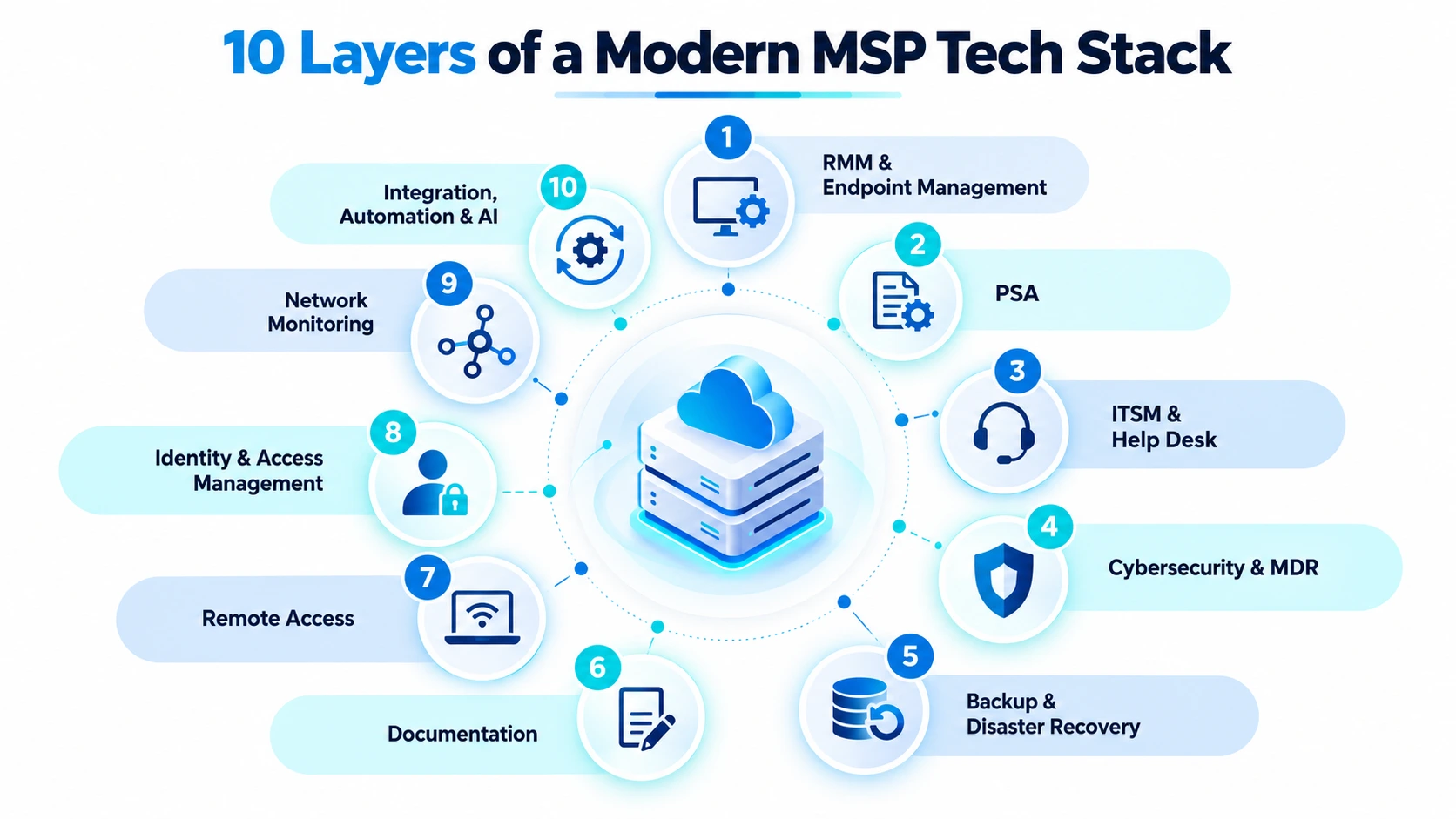
Explore the 10-Layer MSP StackThe best MSP tools in 2026 do far more than monitor computers and close support tickets. A modern managed service provider needs an integrated technology stack capable of managing endpoints, protecting identities, detecting threats, recovering data, documenting customer environments and automating repetitive technician work.
For MSPs serving businesses across the United States, choosing the right stack has become a strategic business decision. A provider might support a medical practice in Texas, a CPA firm in New York, a construction company in Florida and a professional-services organization in California—each with different infrastructure, security, compliance and recovery requirements.
What Tools Does a Modern MSP Need?
Most managed service providers need approximately ten technology capabilities. However, that does not mean you need ten separate vendors. Increasingly, several functions can be consolidated into one platform.
RMM
Endpoint monitoring, patching, automation and management.
PSA
Tickets, SLAs, contracts, technician time, projects and billing.
ITSM
Incident, service request, change and support workflows.
Cybersecurity
EDR, MDR, threat detection, response and security operations.
Backup & DR
Data protection, recovery, replication and business continuity.
Documentation
SOPs, passwords, network data, assets and customer knowledge.
Remote Access
Secure unattended and assisted remote troubleshooting.
IAM
MFA, SSO, access policies, identity and privileged controls.
Network Monitoring
Routers, firewalls, switches, access points and WAN visibility.
Automation & AI
Connect systems and reduce repetitive technician work.
| Technology Layer | Primary Purpose | Platforms to Evaluate |
|---|---|---|
| RMM | Monitor, patch, automate and manage endpoints. | NinjaOne, N-able, ConnectWise, Atera, SuperOps, Syncro |
| PSA | Tickets, contracts, projects, SLAs and billing. | HaloPSA, Autotask, ConnectWise PSA, SuperOps |
| Cybersecurity | Endpoint detection, investigation and response. | Huntress, Microsoft Defender, SentinelOne, CrowdStrike |
| Backup & DR | Protect systems and provide reliable recovery. | Veeam, Cove, Acronis, Datto |
| Documentation | Store structured customer and technical information. | Hudu, IT Glue, Confluence |
| IAM | Manage authentication, identity and privileged access. | Microsoft Entra ID, Okta, JumpCloud, Duo |
| Automation | Connect tools and eliminate repetitive tasks. | Rewst, ONEiO, Power Automate, Workato |
Remote Monitoring and Management — RMM
RMM remains the operational center of most MSP environments. It allows technicians to remotely monitor and manage hundreds or thousands of customer devices through one administrative platform.
Important RMM Capabilities
NinjaOne
NinjaOne is one of the strongest platforms to evaluate for SMB- and mid-market-focused MSPs. Its strengths include endpoint visibility, policy-driven management, patching, automation and remote administration.
Atera
Atera combines RMM and service-management capabilities while aggressively introducing AI-assisted technician workflows.
SuperOps
SuperOps combines RMM and PSA functionality with an increasingly AI-centric approach to tickets, assets, alerts and MSP operations.
N-able & ConnectWise
N-able and ConnectWise remain major MSP technology providers and can be particularly appropriate for mature environments with established workflows and broader ecosystem requirements.
How I Would Evaluate an RMM
- Patch success rate
- Alert volume per endpoint
- False-positive rate
- Remote-session reliability
- Script success
- Agent stability
- Policy-management effort
- API capabilities
- Technician training time
- Customer onboarding time
Professional Services Automation — PSA
If RMM manages technology, PSA manages the business surrounding that technology. It connects support work with customers, service agreements, technician time, SLA performance, projects and billing.
HaloPSA
Excellent for providers that want highly customizable workflows, ticketing, contracts, billing, service catalogs and client portals.
Autotask PSA
A mature PSA commonly found in established MSP operations, particularly within the broader Kaseya and Datto ecosystem.
ConnectWise PSA
A deep service-management option for organizations already invested in the ConnectWise ecosystem.
SuperOps & Syncro
Combined RMM/PSA platforms can reduce integration and licensing complexity for smaller and mid-sized providers.
ITSM and Help Desk
Some MSPs operate entirely through their PSA. Others support larger customers that use platforms such as ServiceNow, Jira Service Management or Freshservice for internal IT workflows.
This is especially important for co-managed IT and enterprise customers, where each organization may need to keep its own platform as the system of record.
Cybersecurity, EDR and MDR
Traditional antivirus is no longer a complete managed cybersecurity strategy. A modern MSP security stack should be built in layers.
Huntress
Huntress is especially relevant to SMB-focused MSPs because it combines endpoint technology with a managed security operations model.
Microsoft Defender
A strong option for Microsoft-centric environments, particularly when combined with Entra ID, Intune, Conditional Access and Microsoft 365 security controls.
SentinelOne
Suitable for advanced endpoint protection, EDR and security-focused managed service offerings.
CrowdStrike
Particularly relevant for higher-security, enterprise and regulated environments requiring advanced detection and response.
Backup and Disaster Recovery
One of the most dangerous mistakes in managed IT is treating a successful backup job as proof that a customer can recover from a disaster.
Veeam
Particularly strong for virtualization, Windows Server, hybrid infrastructure, cloud workloads and sophisticated recovery requirements.
N-able Cove
A cloud-first backup platform designed with MSP multi-tenancy and centralized management in mind.
Acronis Cyber Protect Cloud
Interesting for providers pursuing consolidation across backup, disaster recovery, security, endpoint operations and automation.
Datto BCDR
Remains relevant for service providers focused on appliance-based business continuity and rapid recovery workflows.
Recommended Recovery Testing
- Regular file-level recovery tests
- Quarterly virtual-machine restore validation
- Microsoft 365 restore testing
- Documented disaster-recovery simulations
- Periodic RPO and RTO review
MSP Documentation
Poor documentation quietly destroys MSP profitability. Technicians lose valuable time rediscovering firewall information, WAN addresses, server roles, Microsoft tenant data, backup configuration, vendor contacts and application details.
Hudu
A flexible MSP documentation platform for structured assets, passwords, SOPs, processes and client information.
IT Glue
One of the most widely recognized MSP documentation platforms, with a broad integration ecosystem.
Every Client Should Have Consistent Documentation For
Remote Access and Remote Support
Remote-support tools are mission-critical because they form part of the privileged access path into customer systems.
Platforms to evaluate include NinjaOne Remote, ConnectWise ScreenConnect, Splashtop and TeamViewer.
Security Controls to Review
Identity and Access Management
Identity has become one of the primary security control planes. A fully patched endpoint can still be compromised when an attacker gains access to a privileged cloud identity.
Major platforms include Microsoft Entra ID, Okta, JumpCloud, Duo and OneLogin.
Recommended Identity Controls
- Multi-factor authentication
- Conditional Access
- Separate administrator accounts
- Privileged role management
- Emergency-access accounts
- Device compliance requirements
- Single sign-on
- User lifecycle and offboarding policies
Network Monitoring
RMM agents cannot be installed on every network device. MSPs often need visibility into routers, firewalls, switches, access points, UPS devices, printers, NAS systems and WAN links.
Auvik
Strong for automated discovery, topology, SNMP visibility, configuration data and multi-customer network management.
Domotz
A useful option for SMB-focused MSPs that need accessible network monitoring and remote visibility.
PRTG
Highly customizable for technical teams that want granular sensors and monitoring dashboards.
LogicMonitor
More suitable as infrastructure becomes larger and enterprise monitoring requirements increase.
Integration, Automation and AI
Every time a technician manually copies data between two systems, the MSP pays a hidden integration tax.
Rewst
Designed around MSP automation, including onboarding, offboarding, Microsoft 365 administration, licensing and service workflows.
ONEiO
Particularly relevant for bidirectional integration between customer ITSM environments and MSP service platforms.
Microsoft Power Automate
Especially valuable in Microsoft-centric environments using Microsoft 365, Teams, Outlook, SharePoint and Power Platform.
AI Assistants
AI is increasingly appearing directly inside RMM, PSA, cybersecurity, backup and documentation platforms.
Useful AI Applications for MSPs
A Practical 2026 MSP Stack
For a U.S.-focused MSP supporting SMB and mid-market organizations, I would begin with an architecture similar to this:
Recommended MSP Stack by Company Size
Lean MSP
- Atera, Syncro or SuperOps
- Microsoft Defender + Huntress
- Cove or Acronis
- Hudu
- Microsoft Entra ID
- Native automation first
Growing MSP
- NinjaOne or N-able
- HaloPSA or Autotask
- Huntress / Microsoft / SentinelOne
- Veeam, Cove or Acronis
- Hudu or IT Glue
- Auvik
- Rewst + Power Automate
Mature MSP / MSSP
- Enterprise RMM and PSA
- SIEM and XDR
- 24/7 SOC or MDR
- PAM
- SASE / Zero Trust
- Enterprise backup tiers
- ITSM integrations
- Security orchestration
Compliance Considerations for U.S. MSPs
A single standardized package is not appropriate for every industry. Customers can face very different contractual and regulatory requirements.
Healthcare
HIPAA-related privacy and security requirements may apply.
Financial Services
FTC Safeguards Rule and related security requirements may apply.
Payment Processing
PCI DSS requirements may affect security architecture.
Defense Contractors
CMMC and NIST-related requirements may apply.
Privacy
State privacy requirements can affect customer obligations.
Cyber Insurance
Insurers increasingly require specific technical controls.
How to Select MSP Software
1. Define the Service Before Choosing the Tool
Decide whether you are selling managed endpoints, managed Microsoft 365, backup, MDR, compliance support, network management or another service. Then map software to the service.
2. Define Your Systems of Record
Decide which platform owns each type of information. For example, the PSA may own customer agreements, the RMM owns endpoint inventory, and the documentation platform owns SOPs.
3. Map the Workflow
4. Evaluate Security
Review MFA, SSO, role-based access, audit logs, API permissions, encryption, tenant isolation, session controls and incident-response procedures.
5. Run a Real Pilot
Sales demonstrations do not reveal everyday technician friction. Test onboarding, patching, ticketing, remote access, reporting and automation with real technicians.
6. Measure Total Cost of Ownership
Include licensing, onboarding, migration, API access, training, integration, storage, consulting and technician labor.
The Biggest MSP Tech Stack Mistakes
Too Many Tools
Each additional platform creates licensing, training, integration and administration overhead.
Overlapping Security
Duplicate security tools can create conflicting agents and alert overload.
Poor Documentation
Undocumented customer environments create repeated troubleshooting labor.
Untested Backups
A green backup status is not proof that a business can recover.
Excessive Privileges
Technicians should receive only the access required for their role.
Automating Bad Processes
Simplify and standardize workflows before automating them.
Frequently Asked Questions About MSP Tools
What are MSP tools?
MSP tools are software platforms used by managed service providers to monitor, manage, secure, support, document and protect customer IT environments.
What are the most important MSP tools?
For most providers, the foundation includes RMM, PSA, cybersecurity, backup, documentation, remote access and identity management. Network monitoring and automation become increasingly important as the MSP scales.
What is the best RMM for MSPs?
There is no universal winner. NinjaOne, N-able, ConnectWise RMM, Atera, SuperOps and Syncro serve different operational models. The best platform depends on endpoint requirements, automation, integrations, technician workflow and budget.
What is the difference between RMM and PSA?
RMM manages technology such as endpoints, monitoring, patching and automation. PSA manages the service business, including tickets, contracts, SLAs, technician time, projects and billing.
Does an MSP need MDR?
Not every customer needs the same security stack. However, businesses with meaningful cybersecurity risk should strongly consider managed detection and response or managed EDR to provide continuous investigation and response.
Should MSPs use AI?
Yes, particularly for ticket summarization, scripting, alert analysis, knowledge retrieval, reporting and automation. High-impact administrative actions should still use permissions, logging and human approval.
How many tools should an MSP use?
There is no ideal number. Use the fewest platforms required to deliver services securely and reliably without sacrificing important capabilities.
The Best MSP Stack Is Not the One With the Most Tools
The best MSP technology stack is the one that lets technicians detect problems earlier, automate routine work, protect customer systems, recover data reliably, document environments and demonstrate measurable business value.
RMM, PSA, cybersecurity, backup, documentation, remote access, identity, networking and integration remain the foundation. The significant change in 2026 is that AI is becoming part of nearly every layer.
MSPs that simply add AI products to disorganized operations may gain little. Providers that first standardize processes, integrate systems and then apply AI to repetitive work have a much greater opportunity to improve service quality and operating margins.